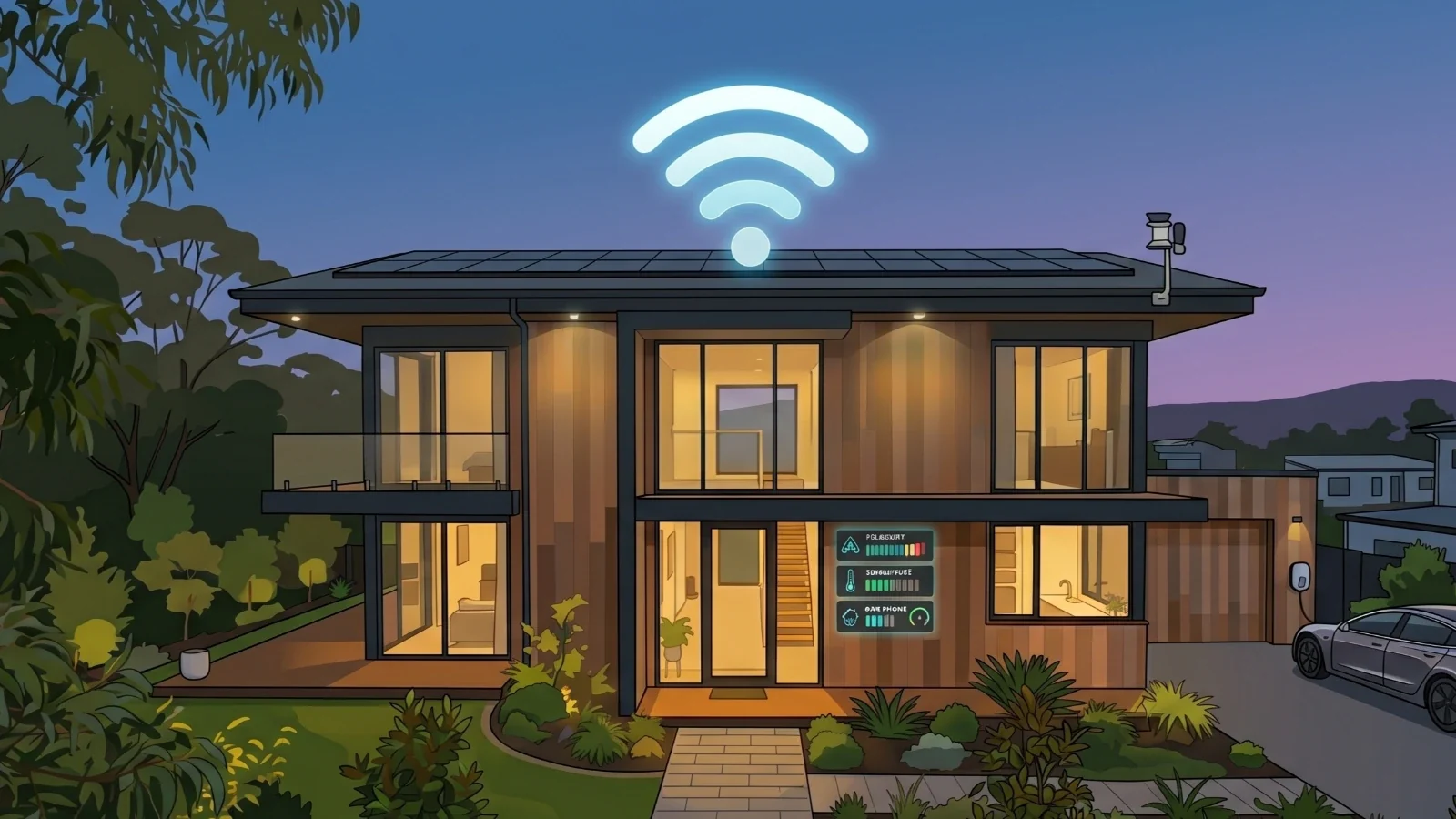
TL;DR: In this project, we build a Smart Home Automation System using Arduino and multiple sensors in Ayantrik Lab. The system monitors gas, fire, light, and rain conditions, displays real-time status on an LCD, and triggers alerts using a buzzer.
The Problem / Why This Matters
Modern homes require smart monitoring systems to ensure:
- Safety
- Energy efficiency
- Automation
- Real-time alerts
Traditional homes lack automated detection for:
- Gas leaks
- Fire hazards
- Lighting conditions
- Weather changes
This project is available here Try here
What is a Smart Home Automation System?
A Smart Home system uses sensors and controllers to:
- Monitor environmental conditions
- Automatically respond to changes
- Alert users in dangerous situations
In this project:
- Sensors → Detect conditions
- Arduino → Processes data
- LCD → Displays status
- Buzzer → Alerts user
Features of This Project
- Fire detection using flame sensor
- Gas leakage detection using MQ-2 sensor
- Rain detection
- Light detection using LDR
- Real-time display on LCD
- Alert system using buzzer
Prerequisites
Components used:
- Arduino Uno
- MQ-2 Gas Sensor
- Flame Sensor
- LDR Sensor
- Rain Sensor
- LCD 16x2 (I2C)
- Buzzer
All components are available in Ayantrik Lab.
Steps to Create the Project in Ayantrik Lab
1. Open a New Project
Open Ayantrik Lab and create a new project.
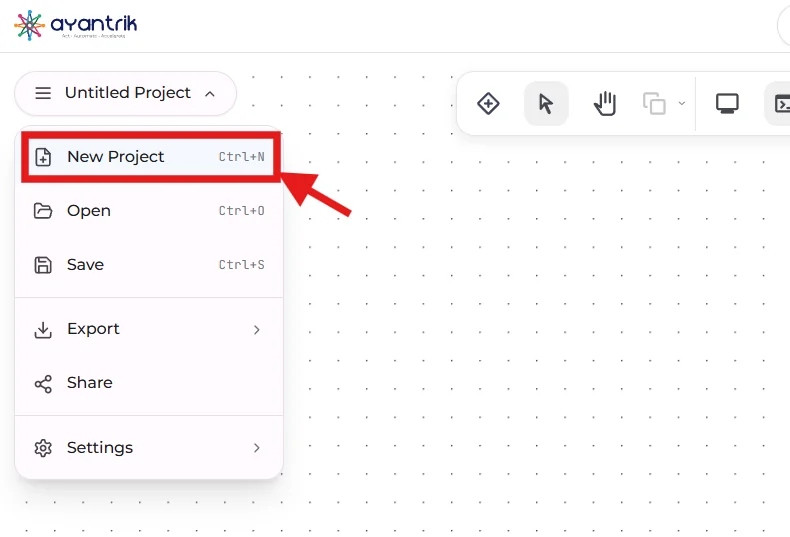 Create New Project
2. Add Components
 Toolbar
Click Add Components and add:
- Arduino Uno
- MQ-2 Gas Sensor
- Flame Sensor
- LDR Sensor
- Rain Sensor
- LCD (16x2 I2C)
- Buzzer
Arrange them properly on the canvas.
3. Make the Circuit Connections
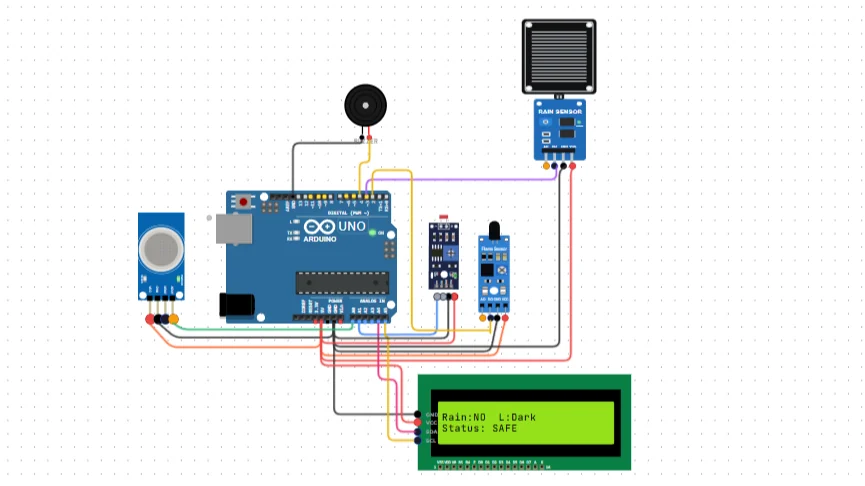 smart home
Gas Sensor (MQ-2)
- VCC → 5V
- GND → GND
- AO → A0
Flame Sensor
- VCC → 5V
- GND → GND
- DO → D2
Rain Sensor
- VCC → 5V
- GND → GND
- DO → D3
LDR Sensor
- VCC → 5V
- GND → GND
- AO → A1
LCD (I2C)
- VCC → 5V
- GND → GND
- SDA → A4
- SCL → A5
Buzzer
- Positive → D4
- Negative → GND
Code
Upload the following code:
cpp#include <LiquidCrystal.h> #include <Wire.h> #include <MPU6050.h> #define minval -5 #define maxval 3 MPU6050 mpu; LiquidCrystal lcd(12, 11, 5, 4, 3, 2); void setup() { lcd.begin(16, 2); Serial.begin(115200); pinMode(7,OUTPUT); pinMode(8,OUTPUT); lcd.print(" EarthQuake "); lcd.setCursor(0, 1); lcd.print(" Detector"); delay (2000); lcd.clear(); Serial.println("Initialize MPU6050"); while(!mpu.begin(MPU6050_SCALE_2000DPS, MPU6050_RANGE_2G)) { Serial.println("Could not find a valid MPU6050 sensor, check wiring!"); delay(500);} mpu.setThreshold(3); checkSettings(); } void checkSettings() { Serial.println(); Serial.print(" * Sleep Mode: "); Serial.println(mpu.getSleepEnabled() ? "Enabled" : "Disabled"); Serial.print(" * Clock Source: "); switch(mpu.getClockSource()) {case MPU6050_CLOCK_KEEP_RESET: Serial.println("Stops the clock and keeps the timing generator in reset"); break; case MPU6050_CLOCK_EXTERNAL_19MHZ: Serial.println("PLL with external 19.2MHz reference"); break; case MPU6050_CLOCK_EXTERNAL_32KHZ: Serial.println("PLL with external 32.768kHz reference"); break; case MPU6050_CLOCK_PLL_ZGYRO: Serial.println("PLL with Z axis gyroscope reference"); break; case MPU6050_CLOCK_PLL_YGYRO: Serial.println("PLL with Y axis gyroscope reference"); break; case MPU6050_CLOCK_PLL_XGYRO: Serial.println("PLL with X axis gyroscope reference"); break; case MPU6050_CLOCK_INTERNAL_8MHZ: Serial.println("Internal 8MHz oscillator"); break; } Serial.print(" * Gyroscope: "); switch(mpu.getScale()) {case MPU6050_SCALE_2000DPS: Serial.println("2000 dps"); break; case MPU6050_SCALE_1000DPS: Serial.println("1000 dps"); break; case MPU6050_SCALE_500DPS: Serial.println("500 dps"); break; case MPU6050_SCALE_250DPS: Serial.println("250 dps"); break:} Serial.print(" * Gyroscope offsets: "); Serial.print(mpu.getGyroOffsetX()); Serial.print(" / "); Serial.print(mpu.getGyroOffsetY()); Serial.print(" / "); Serial.println(mpu.getGyroOffsetZ()); Serial.println();} void loop() { Vector rawGyro = mpu.readRawGyro(); Vector normGyro = mpu.readNormalizeGyro(); Serial.print(" Xraw = "); Serial.print(rawGyro.XAxis); Serial.print(" Yraw = "); Serial.print(rawGyro.YAxis); Serial.print(" Zraw = "); Serial.println(rawGyro.ZAxis); if(normGyro.XAxis > maxval || normGyro.XAxis < minval && normGyro.YAxis > maxval || normGyro.YAxis < minval && normGyro.ZAxis > maxval || normGyro.ZAxis < minval) { digitalWrite(7,HIGH); digitalWrite(8,HIGH); delay(300); digitalWrite(7,HIGH); digitalWrite(8,HIGH); delay(300); lcd.clear(); lcd.print("***EarthQuake***"); delay (1000); lcd.clear();} else{digitalWrite(7,LOW); digitalWrite(8,LOW);} Serial.print(" Xnorm = "); Serial.print(normGyro.XAxis); Serial.print(" Ynorm = "); Serial.print(normGyro.YAxis); Serial.print(" Znorm = "); Serial.println(normGyro.ZAxis); delay(10);}
How the Logic Works
The system continuously reads data from all connected sensors and makes decisions based on the values.
1. Gas Detection (MQ-2 Sensor)
The gas sensor monitors air quality.
- If gas level increases beyond a safe threshold
→ Buzzer turns ON
→ Warning is displayed
This helps detect gas leaks early.
2. Flame Detection
The flame sensor detects fire.
- If flame is detected
→ Immediate alert is triggered
→ Buzzer activates
This is critical for fire safety.
3. Light Detection (LDR Sensor)
The LDR detects ambient light levels.
- Bright → Day
- Dark → Night
This can be used for:
- Automatic lighting systems
- Energy saving
4. Rain Detection
The rain sensor detects water presence.
- Rain detected → Display updates
- No rain → Normal state
Useful for:
- Automatic window control
- Outdoor system protection
5. LCD Display System
The LCD shows real-time information:
It updates dynamically based on sensor inputs.
6. Buzzer Alert System
The buzzer acts as a warning system.
It turns ON when:
- Gas is detected
- Fire is detected
This ensures immediate user attention.
Expected Behavior
When you run the simulation:
- LCD displays live environmental data
- Sensors continuously monitor conditions
- Buzzer activates during unsafe conditions
- System responds in real-time
Built-in Debugging in Ayantrik Lab
Ayantrik Lab provides a built-in debugging feature that helps debug both:
- Circuit connections
- Code logic
It can detect:
- Wrong wiring
- Missing connections
- Incorrect pin mapping
- Code errors
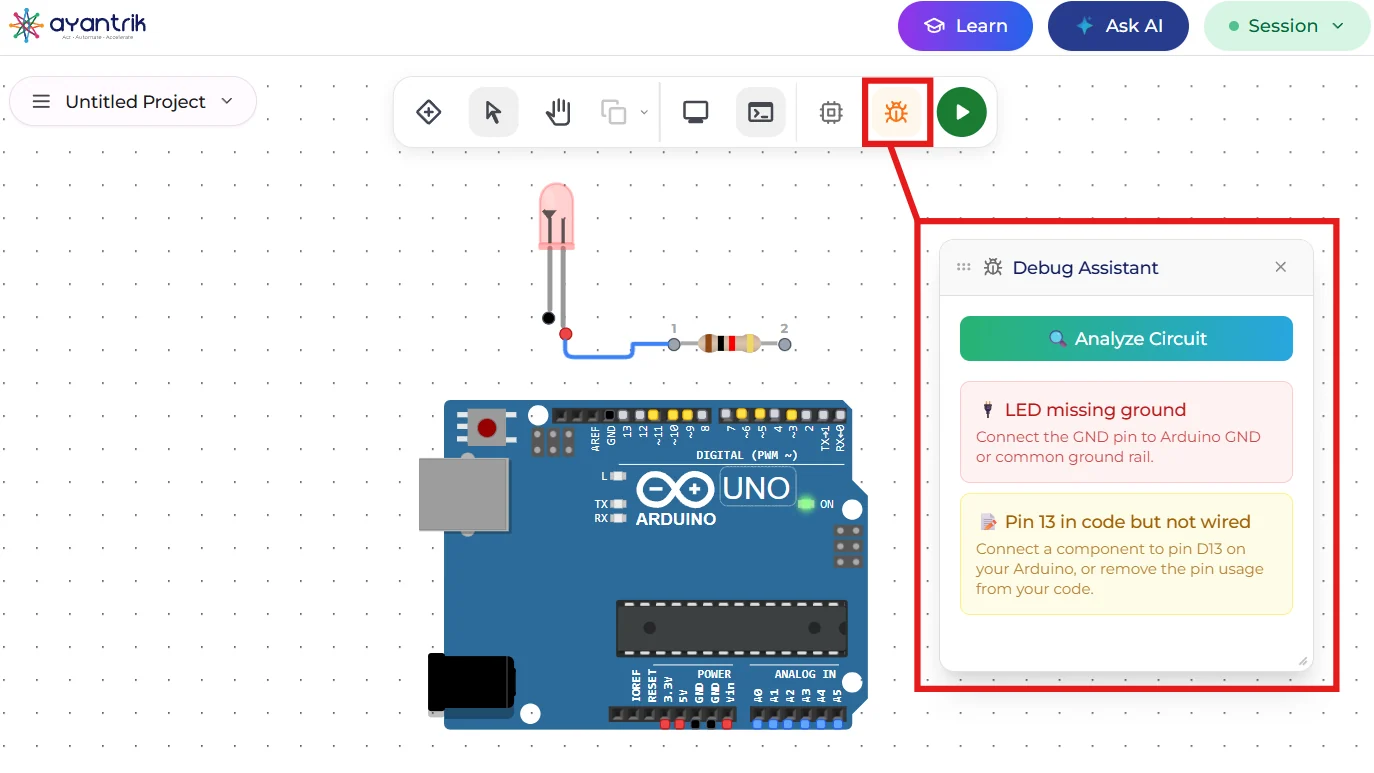 Debugging
This makes building complex systems easier and faster.
Debugging
This makes building complex systems easier and faster.
Conclusion
In this project, we built a Smart Home Automation System using Arduino in Ayantrik Lab.
You learned:
- Multi-sensor integration
- Real-time monitoring systems
- Alert mechanisms using buzzer
- Displaying live data using LCD
- Designing smart automation logic
Try Next
You can enhance this project by:
- Adding IoT alerts (mobile notifications)
- Automating appliances (lights, fans)
- Integrating temperature & humidity sensors
- Adding voice control
Now you're building real-world smart systems, not just circuits.
Happy learning with Ayantrik Lab.!