Arduino Obstacle Avoiding Robot in Ayantrik Lab
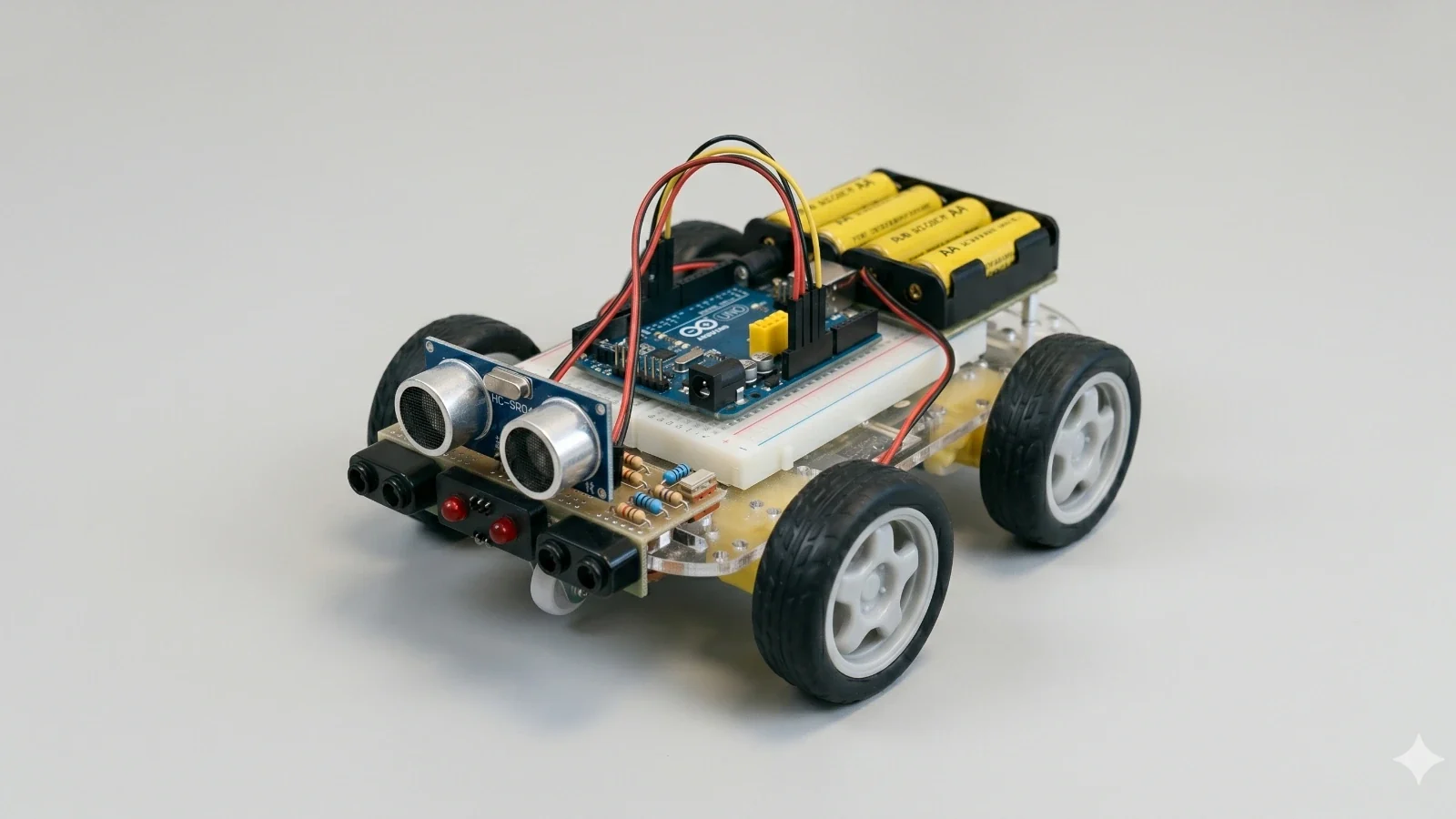
TL;DR: In this project, we build an Obstacle Avoiding Robot using Arduino, ultrasonic sensor, servo motor, motor driver, and DC motors in Ayantrik Lab. The robot detects obstacles in front of it, scans surroundings, and automatically chooses a safe direction to move.
The Problem / Why This Matters
In real-world robotics, avoiding obstacles is one of the most important challenges.
Obstacle avoiding robots are used in:
- Self-driving vehicles
- Delivery robots
- Vacuum cleaning robots
- Industrial automation
- Surveillance systems
To build intelligent robots, we need:
- Sensors to detect environment
- Logic to make decisions
- Motors to act on those decisions
This project demonstrates how a robot can sense, think, and act autonomously.
Basic Concept
This robot uses:
- Ultrasonic Sensor → Measures distance
- Servo Motor → Rotates sensor to scan left/right
- Arduino → Decision making
- Motor Driver (L298N) → Controls motors
- DC Motors → Move the robot
How It Works (Simple Idea)
- Robot moves forward
- Detects obstacle using ultrasonic sensor
- Stops and scans surroundings
- Chooses best direction
- Moves in that direction
This creates an intelligent navigation system.
Prerequisites
Components used in this project:
- Arduino Uno
- Ultrasonic Sensor (HC-SR04)
- Servo Motor
- L298N Motor Driver
- 2 DC Motors
All components are available in Ayantrik Lab component library.
Steps to Create the Project in Ayantrik Lab
1. Open a New Project
Open Ayantrik Lab and create a new project.
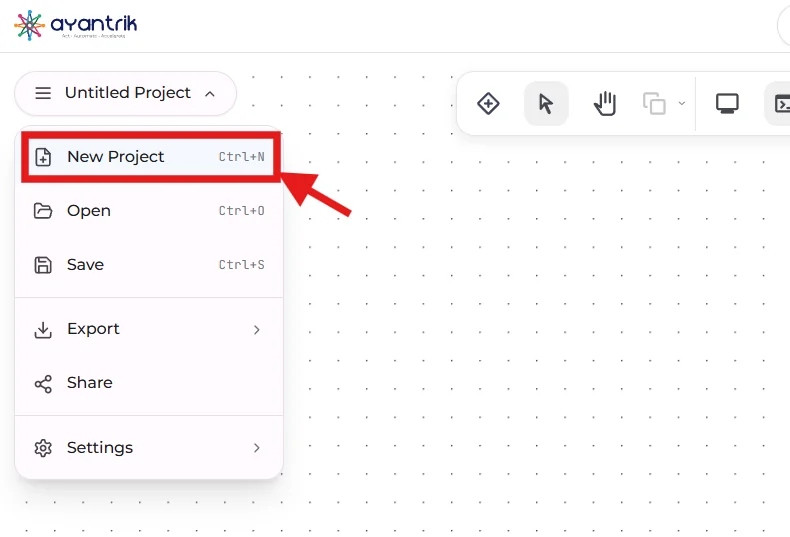 Create New Project
2. Add Components
 Toolbar
Click Add Components and add:
- Arduino Uno
- Ultrasonic Sensor
- Servo Motor
- L298N Motor Driver
- 2 DC Motors
Arrange them properly.
3. Make the Circuit Connections
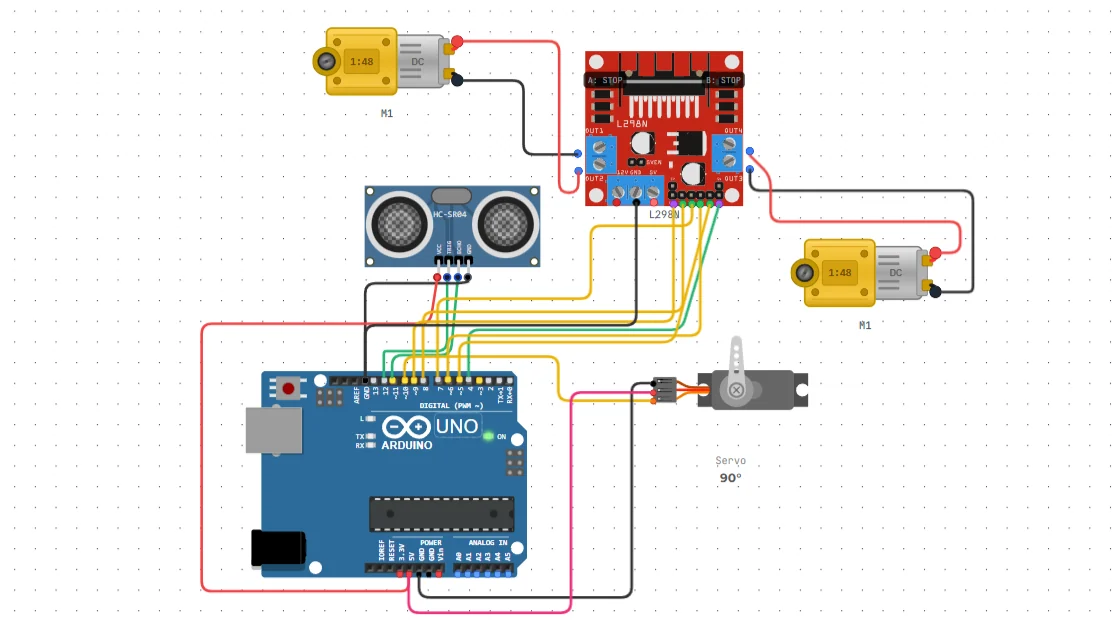 Connection
Ultrasonic Sensor → Arduino
- TRIG → D12
- ECHO → D11
- VCC → 5V
- GND → GND
Servo Motor → Arduino
- Signal → D10
- VCC → 5V
- GND → GND
Arduino → Motor Driver
- D8 → IN1
- D7 → IN2
- D6 → IN3
- D5 → IN4
- D9 → ENA
- D4 → ENB
Motor Driver → Motors
- OUT1 & OUT2 → Left Motor
- OUT3 & OUT4 → Right Motor
Power Connections
- Motor Driver → GND
- All components share common GND
Code
Upload the following Arduino code:
c#include <Servo.h> // Motor A const int enA = 9; const int in1 = 8; const int in2 = 7; // Motor B const int enB = 4; const int in3 = 6; const int in4 = 5; // Ultrasonic const int trigPin = 12; const int echoPin = 11; // Servo Servo radarServo; const int servoPin = 10; const int safetyDistance = 25; // Distance function int getDistance() { digitalWrite(trigPin, LOW); delayMicroseconds(2); digitalWrite(trigPin, HIGH); delayMicroseconds(10); digitalWrite(trigPin, LOW); long duration = pulseIn(echoPin, HIGH); return duration * 0.034 / 2; } void moveForward() { digitalWrite(in1, HIGH); digitalWrite(in2, LOW); digitalWrite(in3, HIGH); digitalWrite(in4, LOW); analogWrite(enA, 160); analogWrite(enB, 160); } void moveStop() { digitalWrite(in1, LOW); digitalWrite(in2, LOW); digitalWrite(in3, LOW); digitalWrite(in4, LOW); } void moveBackward() { digitalWrite(in1, LOW); digitalWrite(in2, HIGH); digitalWrite(in3, LOW); digitalWrite(in4, HIGH); delay(400); } void turnRight() { digitalWrite(in1, HIGH); digitalWrite(in2, LOW); digitalWrite(in3, LOW); digitalWrite(in4, HIGH); delay(500); } void turnLeft() { digitalWrite(in1, LOW); digitalWrite(in2, HIGH); digitalWrite(in3, HIGH); digitalWrite(in4, LOW); delay(500); } int lookRight() { radarServo.write(10); delay(500); int d = getDistance(); radarServo.write(90); return d; } int lookLeft() { radarServo.write(170); delay(500); int d = getDistance(); radarServo.write(90); return d; } void setup() { pinMode(enA, OUTPUT); pinMode(in1, OUTPUT); pinMode(in2, OUTPUT); pinMode(enB, OUTPUT); pinMode(in3, OUTPUT); pinMode(in4, OUTPUT); pinMode(trigPin, OUTPUT); pinMode(echoPin, INPUT); radarServo.attach(servoPin); radarServo.write(90); } void loop() { int distanceAhead = getDistance(); if (distanceAhead <= safetyDistance) { moveStop(); moveBackward(); int right = lookRight(); int left = lookLeft(); if (right >= left) { turnRight(); } else { turnLeft(); } } else { moveForward(); } }
How the Logic Works
The robot continuously checks the distance in front using the ultrasonic sensor and makes decisions based on that.
Step 1: Move Forward
- Robot moves forward normally
- Continuously measures distance ahead
Step 2: Detect Obstacle
- If distance ≤ safety distance (e.g., 25 cm)
Meaning:
- An obstacle is detected in front
Action:
- Robot stops immediately
Step 3: Move Backward
- Robot moves slightly backward
Purpose:
- Create space to make a turn
Step 4: Scan Right Side
- Servo rotates sensor to the right
- Measures distance
Step 5: Scan Left Side
- Servo rotates sensor to the left
- Measures distance
Step 6: Compare Distances
- Compare left and right distances
Decision:
- If right side is clearer → turn RIGHT
- Else → turn LEFT
Step 7: Turn and Continue
- Robot turns in selected direction
- Resumes forward movement
Expected Behavior
When you run the simulation:
- Robot moves forward
- Detects obstacles automatically
- Stops before collision
- Scans both sides
- Chooses the safest direction
- Continues moving
Built-in Debugging in Ayantrik Lab
Ayantrik Lab provides a built-in debugging system.
It helps detect:
- Incorrect wiring
- Missing power connections
- Wrong pin mapping
- Code errors
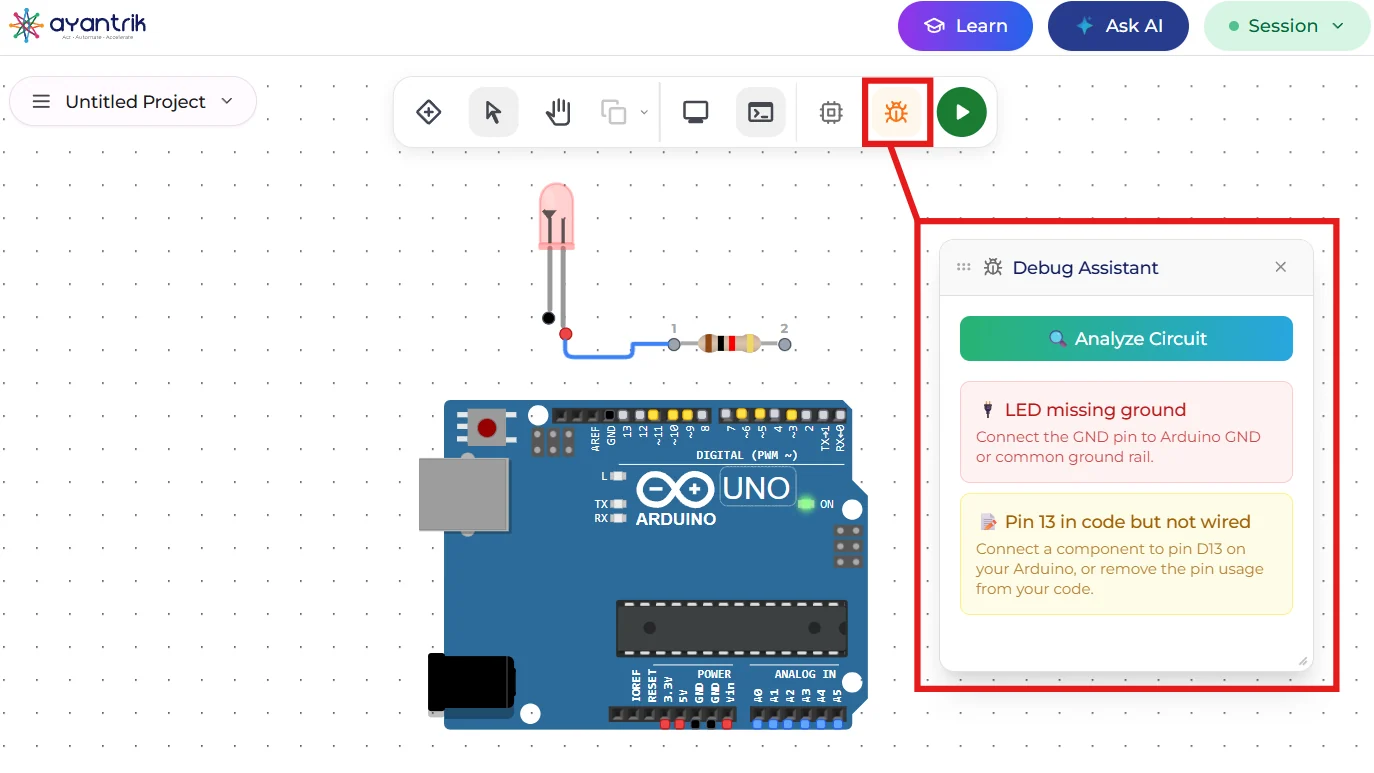 Debugging
This makes learning robotics easier for beginners.
Conclusion
In this project, we built an Obstacle Avoiding Robot using Arduino in Ayantrik Lab.
You learned:
- Distance measurement using ultrasonic sensor
- Servo-based scanning mechanism
- Autonomous decision making
- Motor control using driver module
This is a foundational project for intelligent robotics systems.
Next Steps
Try extending this project:
- Add obstacle memory (path optimization)
- Integrate Bluetooth or WiFi control
- Add multiple sensors for better accuracy
- Build a fully autonomous navigation robot
Happy learning with Ayantrik Lab.!